Dear students, this page will be updated during the training. Please check back regularly for updates.
Location
Feedback
Material
Day 1
Before first Lab.
- Be aware of pop-up windows, example in Safari you need to click tiny icon in the right of the address bar to allow pop-ups.
- Labs have
High-Level Instructions, if you feel confident just try to do with them, if you need more help, you can follow theDetailed Instructions. - Labs have
Choice AandChoice Bas potential solutions, analise bouth and pick the one you think is correct. At the end of the lab you can check theSolutionto see right solution.
Book
Get your book from Gilmor after accessing it the first time from the builder lab’s button.
SDKs
- Python:
- Boto3 documentation, at https://boto3.amazonaws.com/v1/documentation/api/latest/index.html
- Boto3 quickstart at, https://boto3.readthedocs.org/en/latest/guide/quickstart.html
- .NET:
- Install AWSSDK packages with NuGet, at https://docs.aws.amazon.com/AWSSdkDocsNET/latest/V3/DeveloperGuide/net-dg-install-assemblies.html
- Starting a new AWS SDK for .NET project, at https://docs.aws.amazon.com/AWSSdkDocsNET/latest/V3/DeveloperGuide/net-dg-start-new-project.html
- Java:
- Developer guide - AWS SDK for Java 2.x, at https://docs.aws.amazon.com/AWSSdkDocsJava/latest/DeveloperGuide/java-dg-install-sdk.html
- Other:
- AWS Amplify: Amplify Documentation, at https://docs.amplify.aws/
- AWS SDK for Ruby: https://aws.amazon.com/sdk-for-ruby/
- AWS SDK for JavaScript in Node.js: https://aws.amazon.com/sdk-for-javascript/
- AWS SDK for Go: https://docs.aws.amazon.com/sdk-for-go/v1/developer-guide/welcome.html
- AWS SDK for JavaScript: https://docs.aws.amazon.com/AWSJavaScriptSDK/latest/
- AWS SDK for PHP: https://docs.aws.amazon.com/sdk-for-php/v3/developer-guide/welcome.html
- AWS SDK for C++: https://aws.amazon.com/sdk-for-cpp/
- AWS SDK for Swift: https://aws.amazon.com/sdk-for-swift/
- AWS SDK for Rust: https://aws.amazon.com/sdk-for-rust/
- AWS SDK for Kotlin: https://aws.amazon.com/sdk-for-kotlin/
- API references:
- AWS CLI: https://docs.aws.amazon.com/pt_br/cli/latest/index.html
- AWS SDK for Python (Boto3): https://boto3.amazonaws.com/v1/documentation/api/latest/index.html#
- AWS SDK for Java: https://docs.aws.amazon.com/AWSJavaSDK/latest/javadoc/overview-summary.html
- AWS SDK for .NET: https://docs.aws.amazon.com/sdkfornet/v3/apidocs
CLI
- AWS CLI Command Reference (http://docs.aws.amazon.com/cli/latest/reference/).
- https://awsu.me - It’s an open source tool that helps you manage AWS access keys on the command line.
- My Terminal is Warp avaialble for Mac, windows soon.
IAM
- IAM Identities https://docs.aws.amazon.com/IAM/latest/UserGuide/id.html
- IAM Policies https://docs.aws.amazon.com/IAM/latest/UserGuide/access_policies.html
- Creating your first IAM admin user and user group (https://docs.aws.amazon.com/IAM/latest/UserGuide/getting-started_create-admin-group.html)
- Identity-based policies and resource-based policies (https://docs.aws.amazon.com/IAM/latest/UserGuide/access_policies_identity-vs-resource.html)
- IAM roles (https://docs.aws.amazon.com/IAM/latest/UserGuide/id_roles.html)
- AWS service role (https://docs.aws.amazon.com/IAM/latest/UserGuide/id_roles_terms-and-concepts.html#iam-term-service-role)
- Creating a role to delegate permissions to an AWS service (https://docs.aws.amazon.com/IAM/latest/UserGuide/id_roles_create_for-service.html)
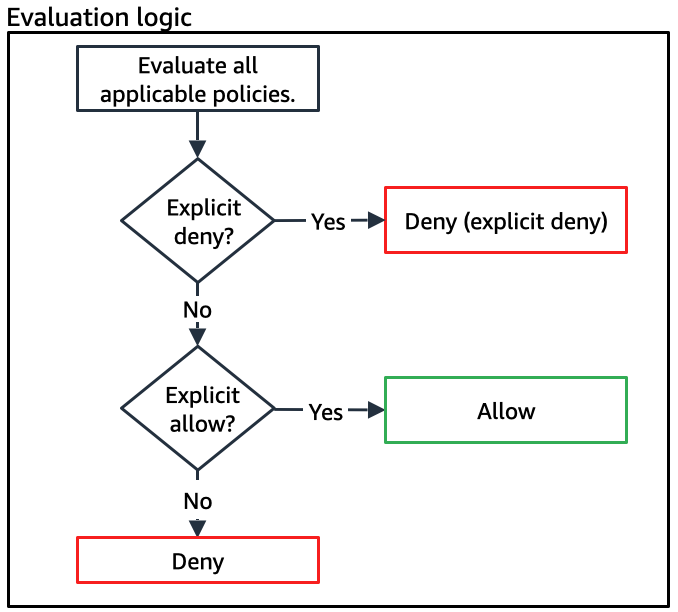
- Policy evaluation logic (https://docs.aws.amazon.com/IAM/latest/UserGuide/reference_policies_evaluation-logic.html)
S3
AWS CLI profiles
Content will be added here asynchronously.
Links
- What happens when you assume a role?
- IAM Policy Simulator
- IAM Policy Generator
- Permissions Boundaries, how they work and what to use them for
- How the Application Load Balancer works
- AWS Tagging: Best Practices
- EC2 Instance List / Comparison Tool
- Spot Instance Advisor –>
Day 2
Lab4: Develop on Lambda - Create Function, Update Function, Publish Function, Invoke Function
- Create Lambda function on AWS Console
- Adapt code to Lambda function
- Publish Lambda function
- Invoke Lambda function with an event json file
- Invoke Lambda function from AWS Console
- Create the remaining Lambda functions
Lab5: Develop on API Gateway - Create API, Create Resource, Create Method, Deploy API, Test API
- Create API Gateway API Resource on AWS Console
- Create GET Method
- Set VTL (Velocity Template Language) to set UserID to student
- Limit the returned data
- Create POST Method
- Enforce a Schema for the POST Method
- Configure CORS (Cross-Origin Request Sharing)
- Deploy API
- Test API in Browser
Lab6: Capstone - Complete the Application
- Configure Cognito
Lab7: Observe the Application Using X-Ray
- Require X-Ray SDK
- Add X-Ray SDK to Lambda function
- Configure logging in deployment
- Deploy application with SAM
- Test website in browser
- Observes traces in X-Ray console
- Analise a specific error Trace in X-Ray console
- Fix the error and deploy again
- Test website in browser
- Review the traces in X-Ray console
Day 3
Links
- AWS Cost Estimator / Calculator
- Online Course Supplement with additional material
🙋♀️ Parking Lot 🙋♂️ - Answers to your open questions
- Q:
- A:
Content will be added here asynchronously.